Showing posts with label ACL. Show all posts

Saturday, June 26, 2021

Time Based Access Control List on Cisco Router/EIGRP

 In today's post, we will work on creating an Access Control List that works in specific time that we decide, this could be useful for a cases that you want to filter traffic according to that time you set 


In many cases you can use this time based ACL, so let's create a simple lab showing the use of it.


First, as usual we will use a simple topology because there is no need to make thing complicated, all you need is three routers or layer3 switches


In my lab, I will be using three Cisco Routers with 15.4T IOS version.


 Topology below:


 In the topology above, R1 hosts 9, 10, 11 will be advertised as a loopback prefixes from R1.


we will filter the access for these hosts inbound to Site-B  on R3 to stop unwanted traffic after working hours to SVR5, SVR6, SVR7


 in my example, I will filter only one of the IP's for the sake of explanation to make sure the rest of hosts have reachability after the filtration.


After configuring EIGRP between the three sites, we can see the routing tables with prefixes for the advertised networks

on both sides.
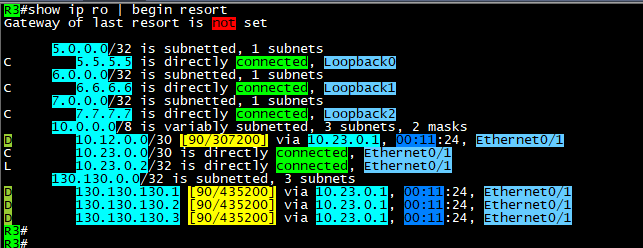


 As you can see above, the host that we will filter is 130.130.130.3/32, we will configure any time that we like the policy 

to start working in it, then we will monitor our logs.


remember it is better to enable logs with the Access list that we will configure in order to see the hits on the policy for the matching

packets.


 Note: the Time based ACL will only be in extended Access Control lists and not in standard.


Now, it is time to define the time range that will be used in access list.


 Commands are:


time-range AFTER-WORK
 absolute start 08:25 26 June 2021

 absolute end 08:43 26 june 2021


the Access list configured as below:

 #ip access-list extended TIME
 #deny   ip host 130.130.130.3 any time-range AFTER-WORK log
 #permit ip any any time-range TIME log


apply it inboung on E0/1 or Router3 and check if its active:


here you go, we have hits on both lines, where we generated some ICMP packets sourced from 130.130.130.3/32

and the permitted log matches the other traffic which include EIGRP packets as well.


As you can see, the packets not reaching the 5.5.5.5/32 SVR when the source of the ICMP is 130.130.130.3/32



 Here above you can see the logs generated by the hit on R3 for both the denied logs and permitted EIGRP packets.

Note: before the time range is activated, it should be seen as inactive as below:


Ok, please note that you must put end option to the time-range settings:


 #time-range AFTER-WORK
 #absolute end 08:42 26 June 2021


 which will put the ACL back to inactive state.


Ok, what about making this task automated? the answer is also by using time-range but with another option which is:


That was it, I hope you enjoyed this post!


Samer Rafid Saleem


Saturday, June 19, 2021

Filtering even prefixes in third octet with Access Lists

 In this post, we will simulate a filtration scenario where you are tasked to filter (Deny) subnets that has even numbers in the third octet.

we will use the following topology:


Three routers are enough to do the trick, they all working in IGP (OSPF) area 0, each router is using his Loopback0 as OSPF router-id.

all interfaces are enabled for OSPF, we will use R3 to advertise many loopback prefixes

10.150.1.1/32 ==> 10.150.10.1/32

You can of course consider R1 is branch office and R2 is where network security engineer applying filtration to prevent important sites (even 3rd octet subnets) from entering  to both (R2 and R1)

In order to do this, we will create a standard access list, in order to match prefixes and not extended access list.

R2:

#enable

#configure terminal 

#access-list 1 deny   10.150.0.0 0.0.254.255 log
#access-list 1 permit any log

 router ospf 1
 router-id 2.2.2.2
 network 0.0.0.0 255.255.255.255 area 0
 distribute-list 1 in Ethernet0/1
R2#

After we applied the distribute list, we will start getting logs on R2

R2#
*Jun 19 06:11:02.383: %SEC-6-IPACCESSLOGNP: list 1 denied 0 10.150.8.1 -> 0.0.0.0, 1 packet  
*Jun 19 06:11:02.384: %SEC-6-IPACCESSLOGNP: list 1 denied 0 10.150.6.1 -> 0.0.0.0, 1 packet  
*Jun 19 06:11:02.384: %SEC-6-IPACCESSLOGNP: list 1 denied 0 10.150.4.1 -> 0.0.0.0, 1 packet  
*Jun 19 06:11:02.384: %SEC-6-IPACCESSLOGNP: list 1 denied 0 10.150.2.1 -> 0.0.0.0, 1 packet  
*Jun 19 06:11:02.384: %SEC-6-IPACCESSLOGNP: list 1 denied 0 10.150.10.1 -> 0.0.0.0, 1 packet  
R2#


The above logs, shows the even 3rd octet prefixes being denied.

on the same router, you can issue the command: 

#clear ip access-list counters

you will see the permitted prefixes logs:


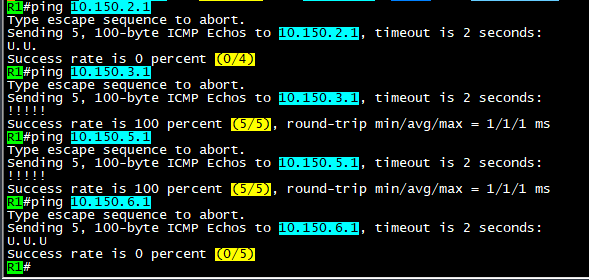
OK, now let's do a test on R1 to see if we can achieve reachability to the allowed/filtered prefixes:


 As you can see, ping to odd 3rd octet of the subnet 10.150.0.0/16 is allowed and ping is successful, while the even 3rd octet is not successful. and shows the letter (U.U.U) which indicates unreachable flag.

So, how did we do that using this wildcard (0.0.254.255)?

The answer is, since we use 255 to say match any, we mean here match any bit from 0-255

But once we remove the 1st bit, we changed this to match any bit except the 1st bit.

Once we done that, all numbers will be even and odd was excluded from the match process.

So for example: subnet 0 is matched and next subnet which is 1 will not be matched because the 1 bit is set to 0, which means its OFF, then subnet 2 will be matched, but 3 will not because you will not be able to add 2+1 bits because 1 is not enabled to be matched.

then, the access list will decide if you want to deny or allow based on your set option.


I hope this was useful!


Samer R. Saleem


Automating Network Configurations with Jinja2 and Python: A Step-by-Step Guide

 In this post, I worked on collecting a code that works with Jinja template. the nice thing in working with Jinja is that you can have basel...