Showing posts with label networkautomation. Show all posts

Thursday, September 14, 2023

How to show Aruba Pre-shared key or PSK password?

 Case: you forgot the password that you configured on a SSID that is already used by many users and you just don't want to do a password reset which might impact user experience.


steps:

1. login to CLI on Aruba WLC using SSH.

2. enter to the configure mode

3. use the command: #encrypt disable

4. issue the command #show running-config

5. use the pipe and include option to filter the output of the configs

or use the following:

#show wlan ssid-profile remote


Wednesday, January 5, 2022

Network Engineering and Automation Questions for review or prepare for Interview


Hello everyone,

As you know, many of us study and struggle a lot in order to reach the level where we can call ourselves Network Engineers, however studying and learning process is not enough because we will forget what we studied after a while if we don't use it, and while trying to learn new things and stay up-to-date, landing new jobs will need to stay fresh on many of the networking topics.

you might be a great network engineer, but you will not be able to get the job based on incomplete answers about topics you already know but forgot how to talk or explain them in an interview.

I was thinking to make a Anki flashcards for Network Engineers that are willing to apply for a job or review networking topics, so I started working on this and the below link contains the file that I will continue to update and re-upload on daily or weekly bases.  

https://drive.google.com/file/d/1wboDLmZeL1DL_onoDCpt05Pc_7wBq79s/view?usp=sharing


This file contains the following topics:

1. BGP

2. OSPF

3. Network Automation

4. Devops

5. MPLS

6. TCP

7. EIGRP


you can download then open with ANKI software on your computer.

anki software > https://apps.ankiweb.net/


I hope you benefit from it. 


Samer.


Thursday, November 18, 2021

Exploring Ansible for Networking: From Ad-Hoc Commands to Playbooks

 Ansible proved to be a very useful tool that can make our life easier.

today, I am writing about my learning experience using Ansible and what my baby-steps toward the automation and programmability world of networking!

let's start with mentioning that Ansible has two ways (as I know) of configuration to interact with network devices or servers.

1. the short way > ad-hoc

2. the more advanced way > ansible playbooks

Ansible ad-hoc provides an easy and fast access to devices from your terminal and enables you to execute commands faster then the usual process, and also can help you access a list of multiple hosts at the same time and do stuff like gathering information in one line of command. 

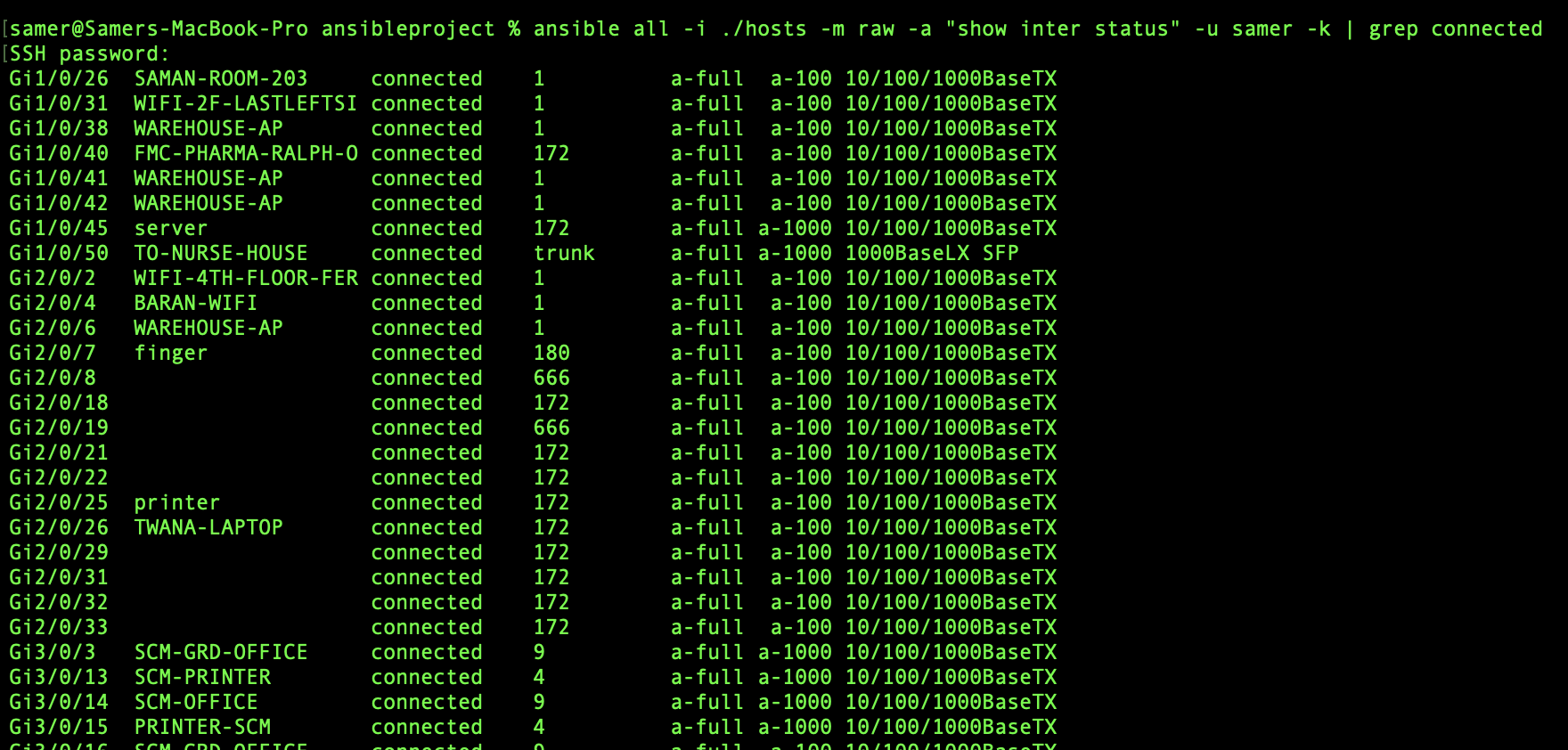
here in my example below you can see how I used the ansible command to access a switch with ip of "10.211.10.36" and used some of the usual commands that we use on Cisco IOS to show configuration or information to do our daily tasks.


the ansible command I used was:

%ansible all -i ./hosts -m raw -a "show interface status" -u samer -k 

here the "all" means all the hosts ip addresses in the file name "hosts"

another output can be seen here below to "show arp" on the same switch:


while seeing the output like this seems very easy, but there might be some problems face you to get to the point that line of command can run without errors, so here is what I got and managed to fix with some google search:

1. Error about deffie-helman group between my MACOS and the switch which 

Fix:

Note: this error will be seen also when you try to make a direct ssh from your terminal to the switch without even using ansible, which makes it a problem in the ssh of the MACOS in this case and here is how to solve.

a. Go to cd /etc/ssh/ and use $sudo nano ssh_config

b. uncomment the following parts


c. paste the following at the end of the same file


save the changes and try to ssh again from your terminal, if that works then try your ad-hoc command and it should work fine.

2. Error about failing the connect to host via SSH and this showed up after fixing error 1 

Failed to connect to the host via ssh: mux_client_request_session: exitval sent twice\r\n"

Fix:

paste the following into the ansible.cfg file by using nano and then saving the changes

connection: local


I hope this was helpful 


Samer R. Saleem


Friday, November 5, 2021

Ansible Another Step Into Network Automation

 What is Ansible?

Ansible is a Network Automation tool, it works with YAML to push or get configs from a network device or group of devices or hosts.

Ansible works with SSH, which means you need to have NETMIKO or PARAMIKO installed along with your Python in order for Ansible codes to work.

how to Install Ansible?

simply by typing this command into your terminal (linux or MAC) $pip install ansible

you can then check your installed version using the command $ansible --version

like below:


Since we already mentioned that Ansible work with YAML as data modeling language, then this means we need to install YAML as well, you can install by:

$pip install PyYAML

below link shows more documents about YAML:

https://pypi.org/project/PyYAML/ 


NOTE: you might face problem while trying to run an Ansible code because of SSH keys between your Computer and the Network/host you are trying to connect to and this will cause an error similar to the following screen:


there is a workaround for this by adding some part in the configuration into the ansible.cfg file as below:


you can open a file and name it as ansible.cfg with nano

$nano ansible.cfg

then add

[defaults]

host_key_checking = false


save the file and run your ansible code again.


Ok, now onto writing a simple Ansible code to get_facts from a Cisco IOS device.

1. in order to do that, you need to have a list of hosts/host configured and that will be created in the same directory that I will be creating my ansible code from, which will be:

samer@Samers-MacBook-Pro ansibleproject % pwd

/Users/samer/Documents/ansibleproject


[cisco] is the group of devices/hosts, so it means you can list your hosts below just like Im listing (10.211.10.36) here for my testing.

[cisco:vars] as you can see is the other information like the OS and username and password of the device/host listed in group Cisco above.

Ok now let us create the Ansible code, which will be by creating a file that I named as test.yml (YAML) format file.


as you can see the file starts with (---)

then (-) name, group of hosts, connection type (SSH), then the tasks that ansible will be doing on the host (tasks:)

NOTE: white-spaces are really important and you will face problem in running the codes if you did not have the correct spacing. 

example of error caused by missing space:


Ok, so our ansible task will be to get the software version of the host (10.211.10.36) and this is done with the last task named "VIEW OS VERSION" which has the var: ansible_net_version

how to run the code now?

$ansible-playbook -i hosts testing.yml

Of course my terminal is already inside the same directory, if your path was not in same directory then you need to add the full path for the files.

(-i) here means inventory which means play ansible against the inventory in the path hosts and the ansible file is testing.yml

ansible will check the hosts/groups in the file called hosts and use the login information in the [var] to login to the host using SSH (NETMIKO/PARAMIKO).

once you fix all of the white-spaces issues and run the code, you should get the following screen of output:


The green screen! OK=1 and failed=0.


Note, you can use ad-hoc command for ansible to push fast commands and do things quickly on one host using the following format:

$ansible 10.211.10.36 -m raw -a "show version" -u samer -k

where k is prompt for password.

this is my introduction into Ansible for Network Automation.


good resources can be found here:

https://developer.cisco.com/startnow/

https://docs.ansible.com/ansible/latest/collections/cisco/ios/ios_command_module.html#examples

https://learningnetwork.cisco.com/s/question/0D53i00000mt0ZGCAY/mastering-ansible-for-the-devnet-associate-exam-derek-winchester


I hope this was useful.

Samer R. Saleem


Saturday, August 28, 2021

An intro. into Network Programmability

Today my post is about something I was doing recently which we all need to move forward and accept it as a vital part of our career development. which is learning python for network engineers.

as you all know, this has became a part from the blueprints and practical day to day work requirements to understand and use programmability of the networks.

Many programming languages exist but myself and many other network engineers if not 99% of us love working with Python. one of the reasons are:

1. Easy to learn and understand Python.

2. Network supporting libraries availability.

3.On systems like Linux and Mac OS Python comes preinstalled.


Okay, so since I knew that it was a must to start learning programming, I was in the phase of accepting this new challenge to simply reason which was (I HATED Programming) and of course this was due to learning in University and the languages we used to learn (Pascal back then). which did not make any sense to me and could not progress in it at all.

But after a while, I started pushing myself to learn and the challenge was (where to start?).

Of course learning ability and learning ways are different from one person to another, some people like to start reading on oppose to learn from a video, others are video learn first then book.

I'm latter type of people, so I started looking for video series that can help me learn python and especially network engineers type of learning python.

So my first go to option was (Udemy.Com) where I searched and found David Bombal's training series.(you can find lots of videos on YouTube as well)

and it was really good purchase compared to the price and the material quality.

 Started watching the videos at first which all was about 2-5 minutes long videos, which you think "that is short video!" but try again when you hate something and try to watch it for a minute.

As soon as David started explaining the need for learning programming language and it's benefits to us as network engineers, I started to realize how important it is and how important to learn it.

Basically you can make your daily tasks, the boring type of tasks that require you to login all devices one by one and collect simple information from each device an easy task and can be done in few seconds.

watching when you run a code to do it's magic in one click is amazing, thinking back about when I was still studying and preparing for my CCIE lab exam, and remembering time inside exam to use NotePad to make configuring devices fast and easy. learning python is sure an easy task to do giving it's value to help you configure hundreds of devices in no time.(Don't you think using notepad is kind of programmability?)

I remember  reactions from people here and there saying that I can't learn python and I can't be programmer and also programmers are going to take our jobs, or saying I'm too old to learn Python (which unfortunately some were a role models to network engineers from all over the world).

This does not make any sense and far beyond truth, no programmer is going to replace network engineer because programmers still don't know what is the commands that a network device can understand or which protocol to use and where and why!

In addition, Information technology in all of it's aspects and sections continue to develop everyday and we must keep ourselves up to date when it comes to knowledge, BTW this applies to everything around us because every profession requires updates, this is normal and we have to accept it!

This is kind of nonsense and you as a network engineer must not fall into this, go and seek knowledge 

by yourself, explore the subjects before deciding what is good or bad of hard or easy. you must be able to adapt new changes and continue learning.

I have finished the training and going beyond this training to finish a book that I bought from CiscoPress.com which is Cisco DEVASC Official Certification Guide. which I will be reading cover to cover now and practice everything in it, this is my next certification goal.

If you don't know what is Cisco DEVASC then go to the following link:

https://www.cisco.com/c/en/us/training-events/training-certifications/exams/current-list/devasc-200-901.html

My last advise to you is to go ahead and start your python learning, you will see the relief you will get after you start using the codes you write. seeing progress through your study is amazing as long as you are doing it the right way, Python and any other programming language is to practice while studying and make mistakes because you will learn the most from your mistakes.

In my next posts, I will be sharing my progress and some of the codes that I practiced on while studying.


So here are links to my study resources in my DEVNET journey:

1. David Bombal's video series

2. Cisco OCG DEVASC https://www.ciscopress.com/store/cisco-certified-devnet-associate-devasc-200-901-official-9780136642961

3. Network Programmability and automation fundamentals  https://www.ciscopress.com/store/network-programmability-and-automation-fundamentals-9781587145148

4. Cisco Learning Network DEVNET Study group https://learningnetwork.cisco.com/s/topic/0TO3i0000008jY5GAI/devnet-certifications-community

5. Cisco DEVNET Courses are also available https://developer.cisco.com

6. Video Course from Cisco Devnet https://developer.cisco.com/video/net-prog-basics/ 

I hope you find my post useful and motivating!


Samer R. Saleem


Tuesday, August 18, 2020

Gather information from Switches using Python - Network Programmability

 In this post, I'm going to use Python and Telnet Library to login into a list of IP addresses and execute some commands and send the output to separated text files.


 My network contains HP access switches and I need to collect some information like product number or serials from each IP in the file called (hpswitch.txt).

ok, let's start


#!/usr/bin/env python
import getpass
import telnetlib

user = ("Admin")
password = ("password")

f = open ("C:\\Users\\user.name\\Desktop\\python\\hpswitch.txt")

for line in f:
    print "Getting Serials from Device  " + (line)
    HOST = line.strip()
    tn = telnetlib.Telnet(HOST)

    tn.read_until("Username:")
    tn.write(user + "\n")
    if password:
        tn.read_until("Password:")
        tn.write(password + "\n")


     #this section is the switch configuration part
    tn.write("super \n")
    tn.write("password\n")
#tn.write("system-view \n")

    tn.write("dis dev manu | in JD368B\n")


    tn.write("quit\n")
#tn.write("quit\n")
    readoutput = tn.read_all()


    saveoutput = open("C:\\Users\\user.name\\Desktop\\serials\\switch" + HOST + ".txt", "w")


    saveoutput.write(readoutput)
    saveoutput.write("\n")
    saveoutput.close

print tn.read_all()

 =================================================================


Same code can be used for checking interfaces or uplinks states.


Samer R. Saleem 

Automating Network Configurations with Jinja2 and Python: A Step-by-Step Guide

 In this post, I worked on collecting a code that works with Jinja template. the nice thing in working with Jinja is that you can have basel...