Showing posts with label BGP. Show all posts

Wednesday, January 5, 2022

Network Engineering and Automation Questions for review or prepare for Interview


Hello everyone,

As you know, many of us study and struggle a lot in order to reach the level where we can call ourselves Network Engineers, however studying and learning process is not enough because we will forget what we studied after a while if we don't use it, and while trying to learn new things and stay up-to-date, landing new jobs will need to stay fresh on many of the networking topics.

you might be a great network engineer, but you will not be able to get the job based on incomplete answers about topics you already know but forgot how to talk or explain them in an interview.

I was thinking to make a Anki flashcards for Network Engineers that are willing to apply for a job or review networking topics, so I started working on this and the below link contains the file that I will continue to update and re-upload on daily or weekly bases.  

https://drive.google.com/file/d/1wboDLmZeL1DL_onoDCpt05Pc_7wBq79s/view?usp=sharing


This file contains the following topics:

1. BGP

2. OSPF

3. Network Automation

4. Devops

5. MPLS

6. TCP

7. EIGRP


you can download then open with ANKI software on your computer.

anki software > https://apps.ankiweb.net/


I hope you benefit from it. 


Samer.


Saturday, August 28, 2021

An intro. into Network Programmability

Today my post is about something I was doing recently which we all need to move forward and accept it as a vital part of our career development. which is learning python for network engineers.

as you all know, this has became a part from the blueprints and practical day to day work requirements to understand and use programmability of the networks.

Many programming languages exist but myself and many other network engineers if not 99% of us love working with Python. one of the reasons are:

1. Easy to learn and understand Python.

2. Network supporting libraries availability.

3.On systems like Linux and Mac OS Python comes preinstalled.


Okay, so since I knew that it was a must to start learning programming, I was in the phase of accepting this new challenge to simply reason which was (I HATED Programming) and of course this was due to learning in University and the languages we used to learn (Pascal back then). which did not make any sense to me and could not progress in it at all.

But after a while, I started pushing myself to learn and the challenge was (where to start?).

Of course learning ability and learning ways are different from one person to another, some people like to start reading on oppose to learn from a video, others are video learn first then book.

I'm latter type of people, so I started looking for video series that can help me learn python and especially network engineers type of learning python.

So my first go to option was (Udemy.Com) where I searched and found David Bombal's training series.(you can find lots of videos on YouTube as well)

and it was really good purchase compared to the price and the material quality.

 Started watching the videos at first which all was about 2-5 minutes long videos, which you think "that is short video!" but try again when you hate something and try to watch it for a minute.

As soon as David started explaining the need for learning programming language and it's benefits to us as network engineers, I started to realize how important it is and how important to learn it.

Basically you can make your daily tasks, the boring type of tasks that require you to login all devices one by one and collect simple information from each device an easy task and can be done in few seconds.

watching when you run a code to do it's magic in one click is amazing, thinking back about when I was still studying and preparing for my CCIE lab exam, and remembering time inside exam to use NotePad to make configuring devices fast and easy. learning python is sure an easy task to do giving it's value to help you configure hundreds of devices in no time.(Don't you think using notepad is kind of programmability?)

I remember  reactions from people here and there saying that I can't learn python and I can't be programmer and also programmers are going to take our jobs, or saying I'm too old to learn Python (which unfortunately some were a role models to network engineers from all over the world).

This does not make any sense and far beyond truth, no programmer is going to replace network engineer because programmers still don't know what is the commands that a network device can understand or which protocol to use and where and why!

In addition, Information technology in all of it's aspects and sections continue to develop everyday and we must keep ourselves up to date when it comes to knowledge, BTW this applies to everything around us because every profession requires updates, this is normal and we have to accept it!

This is kind of nonsense and you as a network engineer must not fall into this, go and seek knowledge 

by yourself, explore the subjects before deciding what is good or bad of hard or easy. you must be able to adapt new changes and continue learning.

I have finished the training and going beyond this training to finish a book that I bought from CiscoPress.com which is Cisco DEVASC Official Certification Guide. which I will be reading cover to cover now and practice everything in it, this is my next certification goal.

If you don't know what is Cisco DEVASC then go to the following link:

https://www.cisco.com/c/en/us/training-events/training-certifications/exams/current-list/devasc-200-901.html

My last advise to you is to go ahead and start your python learning, you will see the relief you will get after you start using the codes you write. seeing progress through your study is amazing as long as you are doing it the right way, Python and any other programming language is to practice while studying and make mistakes because you will learn the most from your mistakes.

In my next posts, I will be sharing my progress and some of the codes that I practiced on while studying.


So here are links to my study resources in my DEVNET journey:

1. David Bombal's video series

2. Cisco OCG DEVASC https://www.ciscopress.com/store/cisco-certified-devnet-associate-devasc-200-901-official-9780136642961

3. Network Programmability and automation fundamentals  https://www.ciscopress.com/store/network-programmability-and-automation-fundamentals-9781587145148

4. Cisco Learning Network DEVNET Study group https://learningnetwork.cisco.com/s/topic/0TO3i0000008jY5GAI/devnet-certifications-community

5. Cisco DEVNET Courses are also available https://developer.cisco.com

6. Video Course from Cisco Devnet https://developer.cisco.com/video/net-prog-basics/ 

I hope you find my post useful and motivating!


Samer R. Saleem


Saturday, July 10, 2021

BGP Message Types logs and PCAPS


Introduction:

BGP stands for Border Gateway Protocol, as the name implies it is a protocol that works on our network border devices, BGP is a an application layer protocol and it does work with TCP protocol 179 to establish it's peering connection with neighbors.

BGP is the internet protocol, all external routing protocols that used and exchanged on the internet are with the help of BGP.

you can check BGP is "application" here:


as stated above (Routing protocol is "Application")


 BGP version4 does support Multi-protocol BGP which means (IPv6, L2VPN, IPv4, VPNv4, VPNv6)

BGP RFC 4271 link > https://datatracker.ietf.org/doc/html/rfc4271 

You can see the BGP version from the command show ip bgp summary below under the letter "V":


NOTE: BGP Version is not the same as BGP table version.


We are going to create a small lab for BGP using Cisco IOS and Cisco IOS-XE using GNS3.

This is going to be the topology:


As been mentioned that BGP uses TCP to establish connections with neighbors, check below pcap for the connection between two routers:


BGP messages exchanged between the Routers will be and of course will continue to be exchanged between the peers are:

1.OPEN messages (establishing TCP Connection)

2.UPDATES (Updates of prefixes advertised or withdrawn)

3.Keep Alive message (it is like a hello message to make sure peer is still alive)

4.Notification message(when error happen in the connections)


These messages can be seen in two ways:

1.Debug on the routers

2.Packet Capture 

We are going view both of them here below:

#debug BGP all

*Jul 10 06:15:19.833: BGP: ses global 12.12.12.2 (0x7FA8710B3168:0) pas Enhanced Refresh cap received in open message

    Line 2: *Jul 10 06:15:12.352: BGP: ses global 12.12.12.1 (0x7FA84FFADDB0:1) Send NOTIFICATION 6/4 (Administrative Reset) 0 bytes
    Line 4: *Jul 10 06:15:12.352: BGP: ses global 12.12.12.2 (0x7FA8710B2D08:1) Send NOTIFICATION 6/4 (Administrative Reset) 0 bytes
    Line 5: *Jul 10 06:15:12.352: %BGP-3-NOTIFICATION_MANY: sent to 2 sessions 6/4 (Administrative Reset) for all peers


CSR#debug ip bgp updates


*Jul 10 06:21:01.715: BGP(0): 12.12.12.2 rcvd UPDATE w/ attr: nexthop 12.12.12.2, origin i, metric 0, merged path 2, AS_PATH
*Jul 10 06:21:01.715: BGP(0): 12.12.12.2 rcvd 123.123.123.1/32
*Jul 10 06:21:01.715: BGP(0): Revise route installing 1 of 1 routes for 123.123.123.1/32 -> 12.12.12.2(global) to main IP table
*Jul 10 06:21:01.715: BGP_Router: unhandled major event code 128, minor 0
*Jul 10 06:21:01.717: BGP(0): 12.12.12.1 NEXT_HOP is on same subnet as the bgp peer and set to 12.12.12.2 for net 123.123.123.1/32, flags 200, sb: C0C0C00, mask: FFFFFF00
*Jul 10 06:21:01.717: BGP(0): (base) 12.12.12.1 send UPDATE (format) 123.123.123.1/32, next 12.12.12.2, metric 0, path 2
*Jul 10 06:21:01.718: BGP(0): 12.12.12.1 rcvd UPDATE w/ attr: nexthop 12.12.12.2, origin i, merged path 1 2, AS_PATH
*Jul 10 06:21:01.718: BGP(0): 12.12.12.1 rcvd 123.123.123.1/32

As you can see above, we have notification, updates, open message, below the keepalives>>>

#debug ip bgp keepalive

*Jul 10 06:22:43.252: BGP: 12.12.12.1 KEEPALIVE write request serviced in BGP_IO
*Jul 10 06:22:43.252: BGP: 12.12.12.1 service 1 read request in BGP_IO
*Jul 10 06:22:43.990: BGP: 12.12.12.2 passive KEEPALIVE write request serviced in BGP_IO
*Jul 10 06:22:43.990: BGP: 12.12.12.2 passive KEEPALIVE requested (rcv_open)
*Jul 10 06:22:43.990: BGP: ses global 12.12.12.2 (0x7FA879168DC8:0) pas service keepalive IO request.
*Jul 10 06:22:43.991: BGP: 12.12.12.2 passive KEEPALIVE write request serviced in BGP_IO
*Jul 10 06:22:43.991: BGP: 12.12.12.2 passive service 2 read request in BGP_IO

*Jul 10 06:22:43.991: BGP: 12.12.12.2 passive received KEEPALIVE, length (excl. header) 0

*Jul 10 06:22:43.991: %BGP-5-ADJCHANGE: neighbor 12.12.12.2 Up

The other way is to use the PCAP using wireshark capturing on GNS3 (this is of course in lab environment):


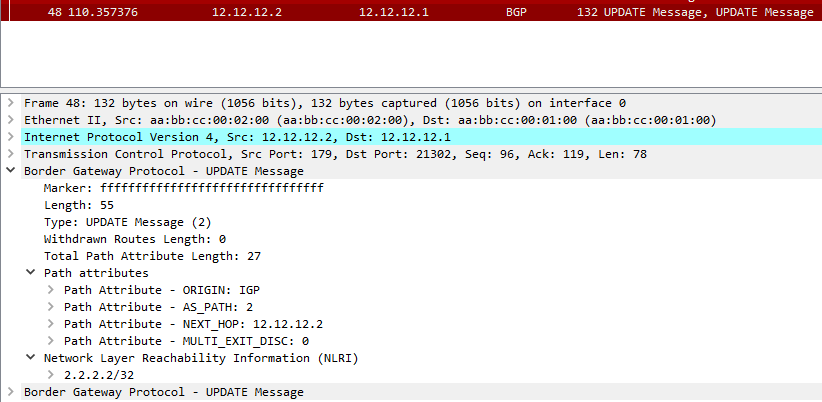
Let's check the update message here and see what does it contain.


As you can see here, the NLRI is being advertised in the update message and it has Router2 loopback prefix (2.2.2.2/32) as it is being sent to Router1.


I hope this was useful for you!


Samer R. Saleem.


First Image Source: Cisco.com


Saturday, June 26, 2021

Time Based Access Control List on Cisco Router/EIGRP

 In today's post, we will work on creating an Access Control List that works in specific time that we decide, this could be useful for a cases that you want to filter traffic according to that time you set 


In many cases you can use this time based ACL, so let's create a simple lab showing the use of it.


First, as usual we will use a simple topology because there is no need to make thing complicated, all you need is three routers or layer3 switches


In my lab, I will be using three Cisco Routers with 15.4T IOS version.


 Topology below:


 In the topology above, R1 hosts 9, 10, 11 will be advertised as a loopback prefixes from R1.


we will filter the access for these hosts inbound to Site-B  on R3 to stop unwanted traffic after working hours to SVR5, SVR6, SVR7


 in my example, I will filter only one of the IP's for the sake of explanation to make sure the rest of hosts have reachability after the filtration.


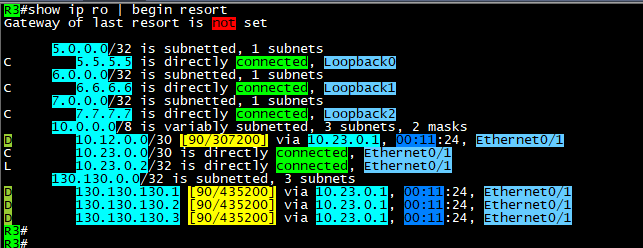
After configuring EIGRP between the three sites, we can see the routing tables with prefixes for the advertised networks

on both sides.


 As you can see above, the host that we will filter is 130.130.130.3/32, we will configure any time that we like the policy 

to start working in it, then we will monitor our logs.


remember it is better to enable logs with the Access list that we will configure in order to see the hits on the policy for the matching

packets.


 Note: the Time based ACL will only be in extended Access Control lists and not in standard.


Now, it is time to define the time range that will be used in access list.


 Commands are:


time-range AFTER-WORK
 absolute start 08:25 26 June 2021

 absolute end 08:43 26 june 2021


the Access list configured as below:

 #ip access-list extended TIME
 #deny   ip host 130.130.130.3 any time-range AFTER-WORK log
 #permit ip any any time-range TIME log


apply it inboung on E0/1 or Router3 and check if its active:


here you go, we have hits on both lines, where we generated some ICMP packets sourced from 130.130.130.3/32

and the permitted log matches the other traffic which include EIGRP packets as well.


As you can see, the packets not reaching the 5.5.5.5/32 SVR when the source of the ICMP is 130.130.130.3/32


 Here above you can see the logs generated by the hit on R3 for both the denied logs and permitted EIGRP packets.

Note: before the time range is activated, it should be seen as inactive as below:


Ok, please note that you must put end option to the time-range settings:


 #time-range AFTER-WORK
 #absolute end 08:42 26 June 2021


 which will put the ACL back to inactive state.


Ok, what about making this task automated? the answer is also by using time-range but with another option which is:


That was it, I hope you enjoyed this post!


Samer Rafid Saleem


Sunday, June 13, 2021

MPLS L3VPN between two Sites that use same Autonomous number

Let's assume that your company asked you to create an MPLS VPN for a customer that wanted to connect two branches of the company together.

However, the customer is using same BGP AS number on both sites, and they can't change it for some reason.

You are required to solve this issue by providing the connectivity and solve any misconfiguration.

In this post, we will discuss what how to configure MPLS-L3VPN type.

Terms will be used:

P => Provider router

PE => provider edge router

CE => Customer edge router

IP addresses are as in the topology.

Using the following topology:

The design shows the ISP network represented by three Routers some of which are P routers (R5) and some are PE's (R2, R3)

On the other hand we will be two sides of the topology to represent CE's Routers.

ISP will be AS#253, while Customer AS#65000

ISP will use OSPF and it's only (area0) you can do the same with any other IGP but of course IS-IS protocol and OSPF are the best due to obvious reasons.

OSPF configuration is enabled on the following interfaces:

R5 E0/0, E0/1, Loopback0

R2 E0/0, Loopback0

R3 E0/1, Loopback0

MPLS LDP is enabled on the same interfaces except the loopbacks.

Command to enable MPLS:

1. option is to enable under interface with command #MPLS IP

2. option is to enable under OSPF process using #MPLS LDP AUTOCONFIG

How to display MPLS FIB table?

R5#show mpls forwarding-table
Local      Outgoing   Prefix           Bytes Label   Outgoing   Next Hop    
Label      Label      or Tunnel Id     Switched      interface              
16         Pop Label  2.2.2.2/32       176893        Et0/0      10.25.0.2   
17         Pop Label  3.3.3.3/32       178410        Et0/1      10.35.0.3   
R5#


Ok, now it's time to configure BGP VPNv4 between the two PE's (R2,R3) which will be the tunnel that we create between the two routers as can be seen in the topology.

we will form the peering using the loopback interfaces.

R2:


 R3:


Next, we will use VRF on the PE's interfaces to CE's, and we will configure the VRF on R2, R3 Route distinguisher RD 65000:65000

Route Target to export and import (65000:65000).


We will need to add interfaces under these VRF's and configure IP addresses on the interfaces facing the CE's routers.

Now, we will enable eBGP between the PE's and the CE's


from the CE's side, it will be normal eBGP configuration, but we will also advertise the loopback's of the CE in BGP table so we can use for testing later on.

the only exceptional thing on CE's we will add the (AllowAS-IN) option on BGP in order to allow incoming BGP AS 65000 updates into each of the routers which should be blocked by default on BGP as a loop prevention mechanism.

of course we have another option to be done on ISP side which is (AS-override), but this time we will use (Allow-AS-IN)

R4, R5 will use same configs:


Now, let's start verifying configs and routes exchange between the two CE's:


As you can see on the output of #show ip bgp that R1 is advertising it's Loopback interface 1.1.1.1/32 and it also receiving the Loopback of R4 4.4.4.4/32

Note the AS path or R1 to reach 4.4.4.4/32 (253, 65000) and this is because R1 allowed same AS to be injected into it's BGP.

 Ok, now let's do some trace between the two Loopbacks:


Success!

you can download the EVE lab file here


Hope this was useful!


Samer R. Saleem.


Thursday, June 10, 2021

Allowing BGP MD5 authentication through Cisco ASA


Author: Samer R Saleem

We have the following scenario where BGP traffic between routers going through an ASA firewall will face a problem if you have an ASA in the middle of two BGP routers trying to peer and they both are using MD5 authentication.

We will create a lab and solve the issue on the firewall by allowing BGP to authenticate and form peering session between the routers, I will be posting in my labbing results and findings during this and the small topology I used EVE-NG community to simulate this case.

The diagram below is self-explanatory, two routers on the sides and an ASA in between, ip addresses are 192.168.1.0/24 on the left and 12.0.0.0/24 on the right side.

AS111 on R1 and AS222 on R2


you will need to configure the ASA interfaces as below:

G0/0 (ip address and nameif) which is as in the diagram above

G0/1 (ip address and nameif)which is as in the diagram above

Then configure both routers interfaces and ping to make sure ASA is reachable.

To provide reachability I will be using  EIGRP and once completed its adjacency process you will see R2 and R1 networks but they will not have reachability between them, so you will need to add ICMP into ASA firewall inspection:

#class inspection_default

#inspect icmp 

After this, you will have reachability between R1 loopback0 to R2 loopback0, here we start configuring eBGP:

R2:

router bgp 222

bgp log-neighbor-changes

network 200.200.200.200 mask 255.255.255.255

neighbor 1.1.1.1 remote-as 111

neighbor 1.1.1.1 password 12345

neighbor 1.1.1.1 disable-connected-check

neighbor 1.1.1.1 update-source Loopback0

R1:

router bgp 111

bgp log-neighbor-changes

network 100.100.100.100 mask 255.255.255.255

neighbor 2.2.2.2 remote-as 222

neighbor 2.2.2.2 password 12345

neighbor 2.2.2.2 disable-connected-check

neighbor 2.2.2.2 update-source Loopback0

Note: I have created two more loopbacks 100 and 200 in both R1 and R2 and advertised over BGP only, and disabled directly connected check on BGP.

You will see the session comes UP and prefixes appear in both BGP RIB tables.

However, once you add password authentication under BGP, you will start seeing the below logs:

R2(config-router)#

*Sep 11 08:54:44.093: %TCP-6-BADAUTH: No MD5 digest from 1.1.1.1(36963) to 2.2.2.2(179) tableid - 0

R2(config-router)#

*Sep 11 08:54:46.098: %TCP-6-BADAUTH: No MD5 digest from 1.1.1.1(36963) to 2.2.2.2(179) tableid - 0

R2(config-router)#

*Sep 11 08:54:50.106: %TCP-6-BADAUTH: No MD5 digest from 1.1.1.1(36963) to 2.2.2.2(179) tableid - 0

And now the BGP session is lost.

Diagnoses and Solution:

the reason for this is that, BGP is uses TCP 179 protocol, which is fine, but once authentication is used with MD5, ASA will strip the authentication which is TCP option 19


And the routers will not see the MD5 coming with connection attempt because it's being filtered by the firewall, so you will need to add the following part on the Cisco ASA:

1.first you need to create an extended ACL to match the traffic between the BGP routers

access-list bgp extended permit tcp host 1.1.1.1 host 2.2.2.2 eq bgp 

access-list bgp extended permit tcp host 2.2.2.2 host 1.1.1.1 eq bgp 

2.create TCP map to allow option 19

tcp-map allow-tcp-19

tcp-options range 19 19 allow

3.use the global policy map to match the class map BGP that we created to match traffic and apply our settings:

policy-map global_policy

class-map BGP 

match access-list bgp

class BGP

set connection random-sequence-number disable

set connection advanced-options allow-tcp-19

After this is done, you will see the bgp session UP again!

Check the logs again:

R2#

*Sep 11 09:14:59.477: %BGP-5-NBR_RESET: Neighbor 1.1.1.1 active reset (BGP Notification sent)

*Sep 11 09:14:59.477: %BGP-5-ADJCHANGE: neighbor 1.1.1.1 Up 

R2#

RFC about Protection of BGP Sessions via the TCP MD5 Signature Option

https://www.ietf.org/rfc/rfc2385.txt

To download the lab go to my post on Cisco learning Network you will find as a zip attached:

EVE-FILE


I hope this was useful!

Samer R. Saleem


Automating Network Configurations with Jinja2 and Python: A Step-by-Step Guide

 In this post, I worked on collecting a code that works with Jinja template. the nice thing in working with Jinja is that you can have basel...