Showing posts with label Cisco. Show all posts

Thursday, November 18, 2021

Exploring Ansible for Networking: From Ad-Hoc Commands to Playbooks

 Ansible proved to be a very useful tool that can make our life easier.

today, I am writing about my learning experience using Ansible and what my baby-steps toward the automation and programmability world of networking!

let's start with mentioning that Ansible has two ways (as I know) of configuration to interact with network devices or servers.

1. the short way > ad-hoc

2. the more advanced way > ansible playbooks

Ansible ad-hoc provides an easy and fast access to devices from your terminal and enables you to execute commands faster then the usual process, and also can help you access a list of multiple hosts at the same time and do stuff like gathering information in one line of command. 

here in my example below you can see how I used the ansible command to access a switch with ip of "10.211.10.36" and used some of the usual commands that we use on Cisco IOS to show configuration or information to do our daily tasks.
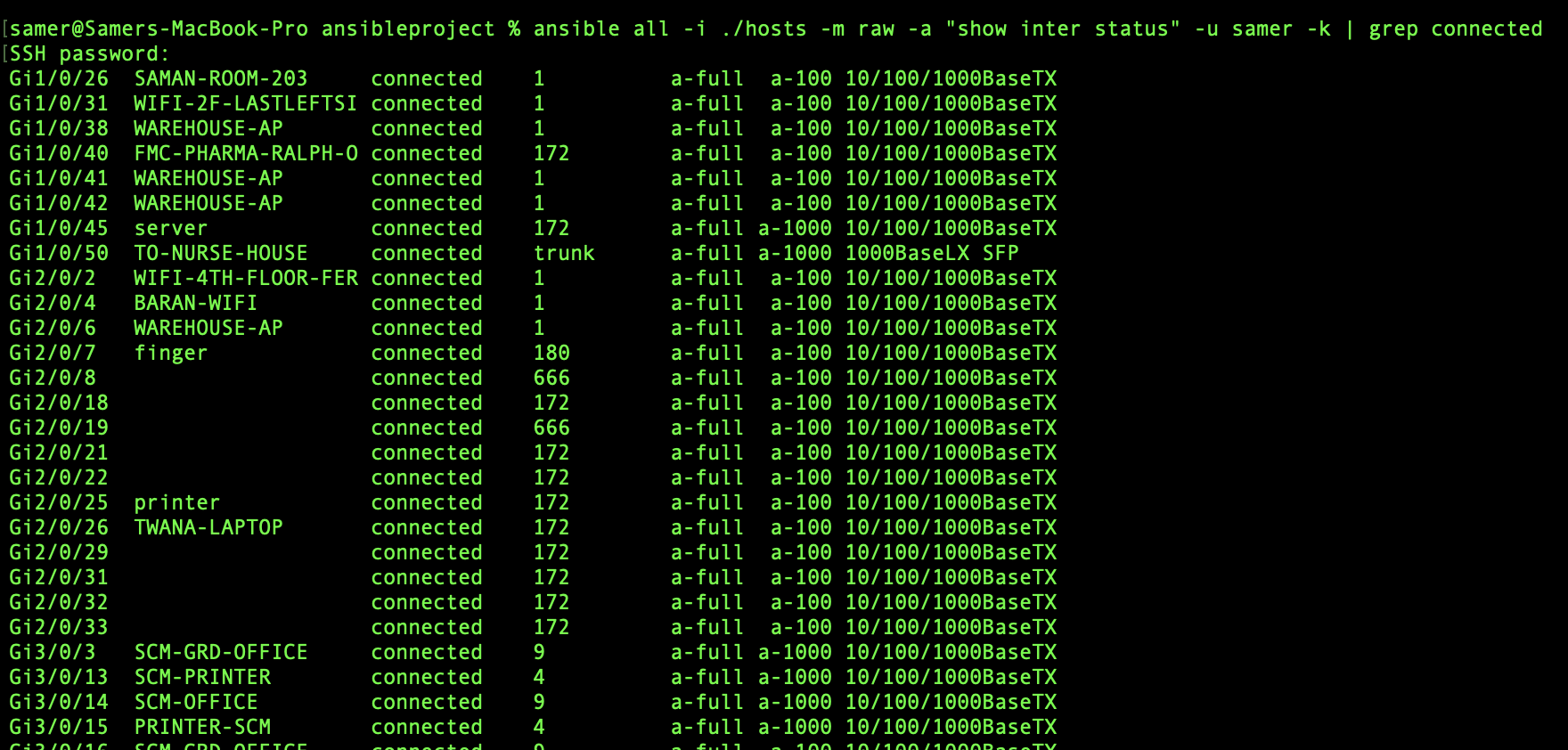


the ansible command I used was:

%ansible all -i ./hosts -m raw -a "show interface status" -u samer -k 

here the "all" means all the hosts ip addresses in the file name "hosts"

another output can be seen here below to "show arp" on the same switch:


while seeing the output like this seems very easy, but there might be some problems face you to get to the point that line of command can run without errors, so here is what I got and managed to fix with some google search:

1. Error about deffie-helman group between my MACOS and the switch which 

Fix:

Note: this error will be seen also when you try to make a direct ssh from your terminal to the switch without even using ansible, which makes it a problem in the ssh of the MACOS in this case and here is how to solve.

a. Go to cd /etc/ssh/ and use $sudo nano ssh_config

b. uncomment the following parts


c. paste the following at the end of the same file


save the changes and try to ssh again from your terminal, if that works then try your ad-hoc command and it should work fine.

2. Error about failing the connect to host via SSH and this showed up after fixing error 1 

Failed to connect to the host via ssh: mux_client_request_session: exitval sent twice\r\n"

Fix:

paste the following into the ansible.cfg file by using nano and then saving the changes

connection: local


I hope this was helpful 


Samer R. Saleem


Friday, November 5, 2021

Ansible Another Step Into Network Automation

 What is Ansible?

Ansible is a Network Automation tool, it works with YAML to push or get configs from a network device or group of devices or hosts.

Ansible works with SSH, which means you need to have NETMIKO or PARAMIKO installed along with your Python in order for Ansible codes to work.

how to Install Ansible?

simply by typing this command into your terminal (linux or MAC) $pip install ansible

you can then check your installed version using the command $ansible --version

like below:


Since we already mentioned that Ansible work with YAML as data modeling language, then this means we need to install YAML as well, you can install by:

$pip install PyYAML

below link shows more documents about YAML:

https://pypi.org/project/PyYAML/ 


NOTE: you might face problem while trying to run an Ansible code because of SSH keys between your Computer and the Network/host you are trying to connect to and this will cause an error similar to the following screen:


there is a workaround for this by adding some part in the configuration into the ansible.cfg file as below:


you can open a file and name it as ansible.cfg with nano

$nano ansible.cfg

then add

[defaults]

host_key_checking = false


save the file and run your ansible code again.


Ok, now onto writing a simple Ansible code to get_facts from a Cisco IOS device.

1. in order to do that, you need to have a list of hosts/host configured and that will be created in the same directory that I will be creating my ansible code from, which will be:

samer@Samers-MacBook-Pro ansibleproject % pwd

/Users/samer/Documents/ansibleproject


[cisco] is the group of devices/hosts, so it means you can list your hosts below just like Im listing (10.211.10.36) here for my testing.

[cisco:vars] as you can see is the other information like the OS and username and password of the device/host listed in group Cisco above.

Ok now let us create the Ansible code, which will be by creating a file that I named as test.yml (YAML) format file.


as you can see the file starts with (---)

then (-) name, group of hosts, connection type (SSH), then the tasks that ansible will be doing on the host (tasks:)

NOTE: white-spaces are really important and you will face problem in running the codes if you did not have the correct spacing. 

example of error caused by missing space:


Ok, so our ansible task will be to get the software version of the host (10.211.10.36) and this is done with the last task named "VIEW OS VERSION" which has the var: ansible_net_version

how to run the code now?

$ansible-playbook -i hosts testing.yml

Of course my terminal is already inside the same directory, if your path was not in same directory then you need to add the full path for the files.

(-i) here means inventory which means play ansible against the inventory in the path hosts and the ansible file is testing.yml

ansible will check the hosts/groups in the file called hosts and use the login information in the [var] to login to the host using SSH (NETMIKO/PARAMIKO).

once you fix all of the white-spaces issues and run the code, you should get the following screen of output:


The green screen! OK=1 and failed=0.


Note, you can use ad-hoc command for ansible to push fast commands and do things quickly on one host using the following format:

$ansible 10.211.10.36 -m raw -a "show version" -u samer -k

where k is prompt for password.

this is my introduction into Ansible for Network Automation.


good resources can be found here:

https://developer.cisco.com/startnow/

https://docs.ansible.com/ansible/latest/collections/cisco/ios/ios_command_module.html#examples

https://learningnetwork.cisco.com/s/question/0D53i00000mt0ZGCAY/mastering-ansible-for-the-devnet-associate-exam-derek-winchester


I hope this was useful.

Samer R. Saleem


Saturday, August 28, 2021

An intro. into Network Programmability

Today my post is about something I was doing recently which we all need to move forward and accept it as a vital part of our career development. which is learning python for network engineers.

as you all know, this has became a part from the blueprints and practical day to day work requirements to understand and use programmability of the networks.

Many programming languages exist but myself and many other network engineers if not 99% of us love working with Python. one of the reasons are:

1. Easy to learn and understand Python.

2. Network supporting libraries availability.

3.On systems like Linux and Mac OS Python comes preinstalled.


Okay, so since I knew that it was a must to start learning programming, I was in the phase of accepting this new challenge to simply reason which was (I HATED Programming) and of course this was due to learning in University and the languages we used to learn (Pascal back then). which did not make any sense to me and could not progress in it at all.

But after a while, I started pushing myself to learn and the challenge was (where to start?).

Of course learning ability and learning ways are different from one person to another, some people like to start reading on oppose to learn from a video, others are video learn first then book.

I'm latter type of people, so I started looking for video series that can help me learn python and especially network engineers type of learning python.

So my first go to option was (Udemy.Com) where I searched and found David Bombal's training series.(you can find lots of videos on YouTube as well)

and it was really good purchase compared to the price and the material quality.

 Started watching the videos at first which all was about 2-5 minutes long videos, which you think "that is short video!" but try again when you hate something and try to watch it for a minute.

As soon as David started explaining the need for learning programming language and it's benefits to us as network engineers, I started to realize how important it is and how important to learn it.

Basically you can make your daily tasks, the boring type of tasks that require you to login all devices one by one and collect simple information from each device an easy task and can be done in few seconds.

watching when you run a code to do it's magic in one click is amazing, thinking back about when I was still studying and preparing for my CCIE lab exam, and remembering time inside exam to use NotePad to make configuring devices fast and easy. learning python is sure an easy task to do giving it's value to help you configure hundreds of devices in no time.(Don't you think using notepad is kind of programmability?)

I remember  reactions from people here and there saying that I can't learn python and I can't be programmer and also programmers are going to take our jobs, or saying I'm too old to learn Python (which unfortunately some were a role models to network engineers from all over the world).

This does not make any sense and far beyond truth, no programmer is going to replace network engineer because programmers still don't know what is the commands that a network device can understand or which protocol to use and where and why!

In addition, Information technology in all of it's aspects and sections continue to develop everyday and we must keep ourselves up to date when it comes to knowledge, BTW this applies to everything around us because every profession requires updates, this is normal and we have to accept it!

This is kind of nonsense and you as a network engineer must not fall into this, go and seek knowledge 

by yourself, explore the subjects before deciding what is good or bad of hard or easy. you must be able to adapt new changes and continue learning.

I have finished the training and going beyond this training to finish a book that I bought from CiscoPress.com which is Cisco DEVASC Official Certification Guide. which I will be reading cover to cover now and practice everything in it, this is my next certification goal.

If you don't know what is Cisco DEVASC then go to the following link:

https://www.cisco.com/c/en/us/training-events/training-certifications/exams/current-list/devasc-200-901.html

My last advise to you is to go ahead and start your python learning, you will see the relief you will get after you start using the codes you write. seeing progress through your study is amazing as long as you are doing it the right way, Python and any other programming language is to practice while studying and make mistakes because you will learn the most from your mistakes.

In my next posts, I will be sharing my progress and some of the codes that I practiced on while studying.


So here are links to my study resources in my DEVNET journey:

1. David Bombal's video series

2. Cisco OCG DEVASC https://www.ciscopress.com/store/cisco-certified-devnet-associate-devasc-200-901-official-9780136642961

3. Network Programmability and automation fundamentals  https://www.ciscopress.com/store/network-programmability-and-automation-fundamentals-9781587145148

4. Cisco Learning Network DEVNET Study group https://learningnetwork.cisco.com/s/topic/0TO3i0000008jY5GAI/devnet-certifications-community

5. Cisco DEVNET Courses are also available https://developer.cisco.com

6. Video Course from Cisco Devnet https://developer.cisco.com/video/net-prog-basics/ 

I hope you find my post useful and motivating!


Samer R. Saleem


Saturday, July 10, 2021

BGP Message Types logs and PCAPS


Introduction:

BGP stands for Border Gateway Protocol, as the name implies it is a protocol that works on our network border devices, BGP is a an application layer protocol and it does work with TCP protocol 179 to establish it's peering connection with neighbors.

BGP is the internet protocol, all external routing protocols that used and exchanged on the internet are with the help of BGP.

you can check BGP is "application" here:


as stated above (Routing protocol is "Application")


 BGP version4 does support Multi-protocol BGP which means (IPv6, L2VPN, IPv4, VPNv4, VPNv6)

BGP RFC 4271 link > https://datatracker.ietf.org/doc/html/rfc4271 

You can see the BGP version from the command show ip bgp summary below under the letter "V":


NOTE: BGP Version is not the same as BGP table version.


We are going to create a small lab for BGP using Cisco IOS and Cisco IOS-XE using GNS3.

This is going to be the topology:


As been mentioned that BGP uses TCP to establish connections with neighbors, check below pcap for the connection between two routers:


BGP messages exchanged between the Routers will be and of course will continue to be exchanged between the peers are:

1.OPEN messages (establishing TCP Connection)

2.UPDATES (Updates of prefixes advertised or withdrawn)

3.Keep Alive message (it is like a hello message to make sure peer is still alive)

4.Notification message(when error happen in the connections)


These messages can be seen in two ways:

1.Debug on the routers

2.Packet Capture 

We are going view both of them here below:

#debug BGP all

*Jul 10 06:15:19.833: BGP: ses global 12.12.12.2 (0x7FA8710B3168:0) pas Enhanced Refresh cap received in open message

    Line 2: *Jul 10 06:15:12.352: BGP: ses global 12.12.12.1 (0x7FA84FFADDB0:1) Send NOTIFICATION 6/4 (Administrative Reset) 0 bytes
    Line 4: *Jul 10 06:15:12.352: BGP: ses global 12.12.12.2 (0x7FA8710B2D08:1) Send NOTIFICATION 6/4 (Administrative Reset) 0 bytes
    Line 5: *Jul 10 06:15:12.352: %BGP-3-NOTIFICATION_MANY: sent to 2 sessions 6/4 (Administrative Reset) for all peers


CSR#debug ip bgp updates


*Jul 10 06:21:01.715: BGP(0): 12.12.12.2 rcvd UPDATE w/ attr: nexthop 12.12.12.2, origin i, metric 0, merged path 2, AS_PATH
*Jul 10 06:21:01.715: BGP(0): 12.12.12.2 rcvd 123.123.123.1/32
*Jul 10 06:21:01.715: BGP(0): Revise route installing 1 of 1 routes for 123.123.123.1/32 -> 12.12.12.2(global) to main IP table
*Jul 10 06:21:01.715: BGP_Router: unhandled major event code 128, minor 0
*Jul 10 06:21:01.717: BGP(0): 12.12.12.1 NEXT_HOP is on same subnet as the bgp peer and set to 12.12.12.2 for net 123.123.123.1/32, flags 200, sb: C0C0C00, mask: FFFFFF00
*Jul 10 06:21:01.717: BGP(0): (base) 12.12.12.1 send UPDATE (format) 123.123.123.1/32, next 12.12.12.2, metric 0, path 2
*Jul 10 06:21:01.718: BGP(0): 12.12.12.1 rcvd UPDATE w/ attr: nexthop 12.12.12.2, origin i, merged path 1 2, AS_PATH
*Jul 10 06:21:01.718: BGP(0): 12.12.12.1 rcvd 123.123.123.1/32

As you can see above, we have notification, updates, open message, below the keepalives>>>

#debug ip bgp keepalive

*Jul 10 06:22:43.252: BGP: 12.12.12.1 KEEPALIVE write request serviced in BGP_IO
*Jul 10 06:22:43.252: BGP: 12.12.12.1 service 1 read request in BGP_IO
*Jul 10 06:22:43.990: BGP: 12.12.12.2 passive KEEPALIVE write request serviced in BGP_IO
*Jul 10 06:22:43.990: BGP: 12.12.12.2 passive KEEPALIVE requested (rcv_open)
*Jul 10 06:22:43.990: BGP: ses global 12.12.12.2 (0x7FA879168DC8:0) pas service keepalive IO request.
*Jul 10 06:22:43.991: BGP: 12.12.12.2 passive KEEPALIVE write request serviced in BGP_IO
*Jul 10 06:22:43.991: BGP: 12.12.12.2 passive service 2 read request in BGP_IO

*Jul 10 06:22:43.991: BGP: 12.12.12.2 passive received KEEPALIVE, length (excl. header) 0

*Jul 10 06:22:43.991: %BGP-5-ADJCHANGE: neighbor 12.12.12.2 Up

The other way is to use the PCAP using wireshark capturing on GNS3 (this is of course in lab environment):


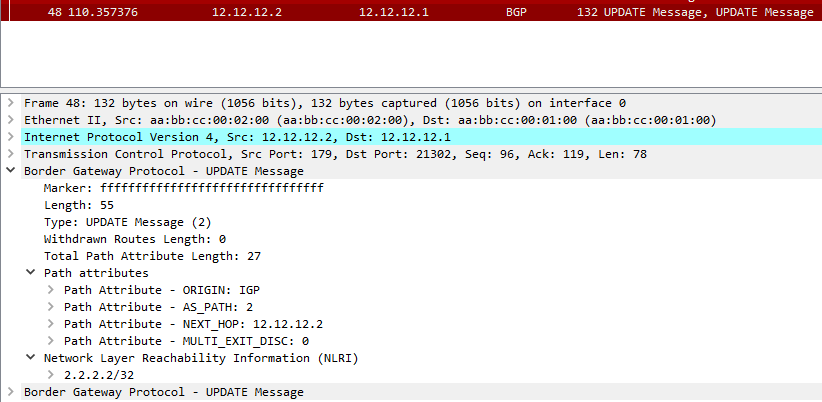
Let's check the update message here and see what does it contain.


As you can see here, the NLRI is being advertised in the update message and it has Router2 loopback prefix (2.2.2.2/32) as it is being sent to Router1.


I hope this was useful for you!


Samer R. Saleem.


First Image Source: Cisco.com


Monday, July 5, 2021

CSMA/CD quick post

One of the topics that we need to understand which will happen on our daily tasks maybe even without knowing it is really happening.

we are talking about collisions and how and when they happen on a network.

let's take the two topology below and compare what will happen in each of them.


As we all know, HUB is an old device that used to connect devices (Computers, Printers) together in a shared network.

the HUB is not smart enough to prevent problems like loops or collisions and it is not manageable and still work with one vlan or any vlan that comes from another attached network.

This is why, in our networks today we don't use Hubs no more. and switches replaced these hubs.

ok, so let's talk about collisions.

Simply, they happen when two or more devices talk (send frames) at the same time. this can easily happen on the Hub devices, simply because they don't have any mechanism to prevent this.


on the other hand, stations do have a feature which was created to limit these collisions and it is called CSMA/CD.

which stands for (Carrier Sense Multiple Access/ Collision detection)

The devices connected to Hub ports will sense the traffic on the shared medium and send frames when there is no frames sent by other devices.

If there is a collision, all ports will send jamming signal to stop sending more frames.

this jamming signal will then ends, and each part of the collided frames will wait for a timer before sending more frames again, these timers will be randomized by each device to make sure no collision happens again. Hence the name of MAC came from (Media Access Control)

A better option than CSMA/CD is CSMA/CA which stands for the same but instead of detection, we have Collision avoidance here, in which a computer will send like a test frame to see if there is any senders then continue sending frames to destination so this can lower the collision chance even more.

So this will be done by computers as a feature working in layer2 to solve some of Hub problems.

This however is not the same on switches, where each port is a separated collision domain from the rest of the ports.

Hope this was useful.


Samer R. Saleem


Saturday, June 26, 2021

Time Based Access Control List on Cisco Router/EIGRP

 In today's post, we will work on creating an Access Control List that works in specific time that we decide, this could be useful for a cases that you want to filter traffic according to that time you set 


In many cases you can use this time based ACL, so let's create a simple lab showing the use of it.


First, as usual we will use a simple topology because there is no need to make thing complicated, all you need is three routers or layer3 switches


In my lab, I will be using three Cisco Routers with 15.4T IOS version.


 Topology below:


 In the topology above, R1 hosts 9, 10, 11 will be advertised as a loopback prefixes from R1.


we will filter the access for these hosts inbound to Site-B  on R3 to stop unwanted traffic after working hours to SVR5, SVR6, SVR7


 in my example, I will filter only one of the IP's for the sake of explanation to make sure the rest of hosts have reachability after the filtration.


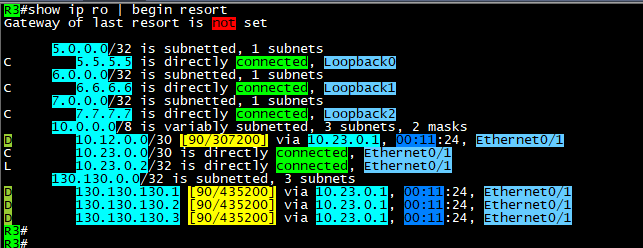
After configuring EIGRP between the three sites, we can see the routing tables with prefixes for the advertised networks

on both sides.


 As you can see above, the host that we will filter is 130.130.130.3/32, we will configure any time that we like the policy 

to start working in it, then we will monitor our logs.


remember it is better to enable logs with the Access list that we will configure in order to see the hits on the policy for the matching

packets.


 Note: the Time based ACL will only be in extended Access Control lists and not in standard.


Now, it is time to define the time range that will be used in access list.


 Commands are:


time-range AFTER-WORK
 absolute start 08:25 26 June 2021

 absolute end 08:43 26 june 2021


the Access list configured as below:

 #ip access-list extended TIME
 #deny   ip host 130.130.130.3 any time-range AFTER-WORK log
 #permit ip any any time-range TIME log


apply it inboung on E0/1 or Router3 and check if its active:


here you go, we have hits on both lines, where we generated some ICMP packets sourced from 130.130.130.3/32

and the permitted log matches the other traffic which include EIGRP packets as well.


As you can see, the packets not reaching the 5.5.5.5/32 SVR when the source of the ICMP is 130.130.130.3/32


 Here above you can see the logs generated by the hit on R3 for both the denied logs and permitted EIGRP packets.

Note: before the time range is activated, it should be seen as inactive as below:


Ok, please note that you must put end option to the time-range settings:


 #time-range AFTER-WORK
 #absolute end 08:42 26 June 2021


 which will put the ACL back to inactive state.


Ok, what about making this task automated? the answer is also by using time-range but with another option which is:


That was it, I hope you enjoyed this post!


Samer Rafid Saleem


Saturday, June 19, 2021

Filtering even prefixes in third octet with Access Lists

 In this post, we will simulate a filtration scenario where you are tasked to filter (Deny) subnets that has even numbers in the third octet.

we will use the following topology:


Three routers are enough to do the trick, they all working in IGP (OSPF) area 0, each router is using his Loopback0 as OSPF router-id.

all interfaces are enabled for OSPF, we will use R3 to advertise many loopback prefixes

10.150.1.1/32 ==> 10.150.10.1/32

You can of course consider R1 is branch office and R2 is where network security engineer applying filtration to prevent important sites (even 3rd octet subnets) from entering  to both (R2 and R1)

In order to do this, we will create a standard access list, in order to match prefixes and not extended access list.

R2:

#enable

#configure terminal 

#access-list 1 deny   10.150.0.0 0.0.254.255 log
#access-list 1 permit any log

 router ospf 1
 router-id 2.2.2.2
 network 0.0.0.0 255.255.255.255 area 0
 distribute-list 1 in Ethernet0/1
R2#

After we applied the distribute list, we will start getting logs on R2

R2#
*Jun 19 06:11:02.383: %SEC-6-IPACCESSLOGNP: list 1 denied 0 10.150.8.1 -> 0.0.0.0, 1 packet  
*Jun 19 06:11:02.384: %SEC-6-IPACCESSLOGNP: list 1 denied 0 10.150.6.1 -> 0.0.0.0, 1 packet  
*Jun 19 06:11:02.384: %SEC-6-IPACCESSLOGNP: list 1 denied 0 10.150.4.1 -> 0.0.0.0, 1 packet  
*Jun 19 06:11:02.384: %SEC-6-IPACCESSLOGNP: list 1 denied 0 10.150.2.1 -> 0.0.0.0, 1 packet  
*Jun 19 06:11:02.384: %SEC-6-IPACCESSLOGNP: list 1 denied 0 10.150.10.1 -> 0.0.0.0, 1 packet  
R2#


The above logs, shows the even 3rd octet prefixes being denied.

on the same router, you can issue the command: 

#clear ip access-list counters

you will see the permitted prefixes logs:


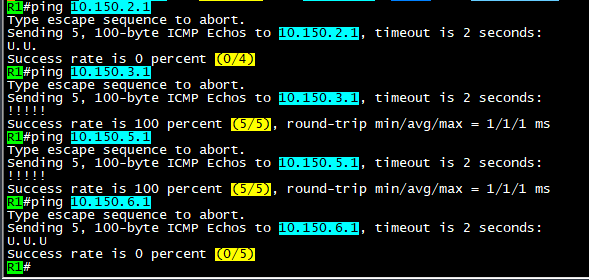
OK, now let's do a test on R1 to see if we can achieve reachability to the allowed/filtered prefixes:


 As you can see, ping to odd 3rd octet of the subnet 10.150.0.0/16 is allowed and ping is successful, while the even 3rd octet is not successful. and shows the letter (U.U.U) which indicates unreachable flag.

So, how did we do that using this wildcard (0.0.254.255)?

The answer is, since we use 255 to say match any, we mean here match any bit from 0-255

But once we remove the 1st bit, we changed this to match any bit except the 1st bit.

Once we done that, all numbers will be even and odd was excluded from the match process.

So for example: subnet 0 is matched and next subnet which is 1 will not be matched because the 1 bit is set to 0, which means its OFF, then subnet 2 will be matched, but 3 will not because you will not be able to add 2+1 bits because 1 is not enabled to be matched.

then, the access list will decide if you want to deny or allow based on your set option.


I hope this was useful!


Samer R. Saleem


Sunday, June 13, 2021

MPLS L3VPN between two Sites that use same Autonomous number

Let's assume that your company asked you to create an MPLS VPN for a customer that wanted to connect two branches of the company together.

However, the customer is using same BGP AS number on both sites, and they can't change it for some reason.

You are required to solve this issue by providing the connectivity and solve any misconfiguration.

In this post, we will discuss what how to configure MPLS-L3VPN type.

Terms will be used:

P => Provider router

PE => provider edge router

CE => Customer edge router

IP addresses are as in the topology.

Using the following topology:

The design shows the ISP network represented by three Routers some of which are P routers (R5) and some are PE's (R2, R3)

On the other hand we will be two sides of the topology to represent CE's Routers.

ISP will be AS#253, while Customer AS#65000

ISP will use OSPF and it's only (area0) you can do the same with any other IGP but of course IS-IS protocol and OSPF are the best due to obvious reasons.

OSPF configuration is enabled on the following interfaces:

R5 E0/0, E0/1, Loopback0

R2 E0/0, Loopback0

R3 E0/1, Loopback0

MPLS LDP is enabled on the same interfaces except the loopbacks.

Command to enable MPLS:

1. option is to enable under interface with command #MPLS IP

2. option is to enable under OSPF process using #MPLS LDP AUTOCONFIG

How to display MPLS FIB table?

R5#show mpls forwarding-table
Local      Outgoing   Prefix           Bytes Label   Outgoing   Next Hop    
Label      Label      or Tunnel Id     Switched      interface              
16         Pop Label  2.2.2.2/32       176893        Et0/0      10.25.0.2   
17         Pop Label  3.3.3.3/32       178410        Et0/1      10.35.0.3   
R5#


Ok, now it's time to configure BGP VPNv4 between the two PE's (R2,R3) which will be the tunnel that we create between the two routers as can be seen in the topology.

we will form the peering using the loopback interfaces.

R2:


 R3:


Next, we will use VRF on the PE's interfaces to CE's, and we will configure the VRF on R2, R3 Route distinguisher RD 65000:65000

Route Target to export and import (65000:65000).


We will need to add interfaces under these VRF's and configure IP addresses on the interfaces facing the CE's routers.

Now, we will enable eBGP between the PE's and the CE's


from the CE's side, it will be normal eBGP configuration, but we will also advertise the loopback's of the CE in BGP table so we can use for testing later on.

the only exceptional thing on CE's we will add the (AllowAS-IN) option on BGP in order to allow incoming BGP AS 65000 updates into each of the routers which should be blocked by default on BGP as a loop prevention mechanism.

of course we have another option to be done on ISP side which is (AS-override), but this time we will use (Allow-AS-IN)

R4, R5 will use same configs:


Now, let's start verifying configs and routes exchange between the two CE's:


As you can see on the output of #show ip bgp that R1 is advertising it's Loopback interface 1.1.1.1/32 and it also receiving the Loopback of R4 4.4.4.4/32

Note the AS path or R1 to reach 4.4.4.4/32 (253, 65000) and this is because R1 allowed same AS to be injected into it's BGP.

 Ok, now let's do some trace between the two Loopbacks:


Success!

you can download the EVE lab file here


Hope this was useful!


Samer R. Saleem.


Thursday, June 10, 2021

Allowing BGP MD5 authentication through Cisco ASA


Author: Samer R Saleem

We have the following scenario where BGP traffic between routers going through an ASA firewall will face a problem if you have an ASA in the middle of two BGP routers trying to peer and they both are using MD5 authentication.

We will create a lab and solve the issue on the firewall by allowing BGP to authenticate and form peering session between the routers, I will be posting in my labbing results and findings during this and the small topology I used EVE-NG community to simulate this case.

The diagram below is self-explanatory, two routers on the sides and an ASA in between, ip addresses are 192.168.1.0/24 on the left and 12.0.0.0/24 on the right side.

AS111 on R1 and AS222 on R2


you will need to configure the ASA interfaces as below:

G0/0 (ip address and nameif) which is as in the diagram above

G0/1 (ip address and nameif)which is as in the diagram above

Then configure both routers interfaces and ping to make sure ASA is reachable.

To provide reachability I will be using  EIGRP and once completed its adjacency process you will see R2 and R1 networks but they will not have reachability between them, so you will need to add ICMP into ASA firewall inspection:

#class inspection_default

#inspect icmp 

After this, you will have reachability between R1 loopback0 to R2 loopback0, here we start configuring eBGP:

R2:

router bgp 222

bgp log-neighbor-changes

network 200.200.200.200 mask 255.255.255.255

neighbor 1.1.1.1 remote-as 111

neighbor 1.1.1.1 password 12345

neighbor 1.1.1.1 disable-connected-check

neighbor 1.1.1.1 update-source Loopback0

R1:

router bgp 111

bgp log-neighbor-changes

network 100.100.100.100 mask 255.255.255.255

neighbor 2.2.2.2 remote-as 222

neighbor 2.2.2.2 password 12345

neighbor 2.2.2.2 disable-connected-check

neighbor 2.2.2.2 update-source Loopback0

Note: I have created two more loopbacks 100 and 200 in both R1 and R2 and advertised over BGP only, and disabled directly connected check on BGP.

You will see the session comes UP and prefixes appear in both BGP RIB tables.

However, once you add password authentication under BGP, you will start seeing the below logs:

R2(config-router)#

*Sep 11 08:54:44.093: %TCP-6-BADAUTH: No MD5 digest from 1.1.1.1(36963) to 2.2.2.2(179) tableid - 0

R2(config-router)#

*Sep 11 08:54:46.098: %TCP-6-BADAUTH: No MD5 digest from 1.1.1.1(36963) to 2.2.2.2(179) tableid - 0

R2(config-router)#

*Sep 11 08:54:50.106: %TCP-6-BADAUTH: No MD5 digest from 1.1.1.1(36963) to 2.2.2.2(179) tableid - 0

And now the BGP session is lost.

Diagnoses and Solution:

the reason for this is that, BGP is uses TCP 179 protocol, which is fine, but once authentication is used with MD5, ASA will strip the authentication which is TCP option 19


And the routers will not see the MD5 coming with connection attempt because it's being filtered by the firewall, so you will need to add the following part on the Cisco ASA:

1.first you need to create an extended ACL to match the traffic between the BGP routers

access-list bgp extended permit tcp host 1.1.1.1 host 2.2.2.2 eq bgp 

access-list bgp extended permit tcp host 2.2.2.2 host 1.1.1.1 eq bgp 

2.create TCP map to allow option 19

tcp-map allow-tcp-19

tcp-options range 19 19 allow

3.use the global policy map to match the class map BGP that we created to match traffic and apply our settings:

policy-map global_policy

class-map BGP 

match access-list bgp

class BGP

set connection random-sequence-number disable

set connection advanced-options allow-tcp-19

After this is done, you will see the bgp session UP again!

Check the logs again:

R2#

*Sep 11 09:14:59.477: %BGP-5-NBR_RESET: Neighbor 1.1.1.1 active reset (BGP Notification sent)

*Sep 11 09:14:59.477: %BGP-5-ADJCHANGE: neighbor 1.1.1.1 Up 

R2#

RFC about Protection of BGP Sessions via the TCP MD5 Signature Option

https://www.ietf.org/rfc/rfc2385.txt

To download the lab go to my post on Cisco learning Network you will find as a zip attached:

EVE-FILE


I hope this was useful!

Samer R. Saleem

Automating Network Configurations with Jinja2 and Python: A Step-by-Step Guide

 In this post, I worked on collecting a code that works with Jinja template. the nice thing in working with Jinja is that you can have basel...