Showing posts with label bgp md5. Show all posts

Wednesday, January 5, 2022

Network Engineering and Automation Questions for review or prepare for Interview


Hello everyone,

As you know, many of us study and struggle a lot in order to reach the level where we can call ourselves Network Engineers, however studying and learning process is not enough because we will forget what we studied after a while if we don't use it, and while trying to learn new things and stay up-to-date, landing new jobs will need to stay fresh on many of the networking topics.

you might be a great network engineer, but you will not be able to get the job based on incomplete answers about topics you already know but forgot how to talk or explain them in an interview.

I was thinking to make a Anki flashcards for Network Engineers that are willing to apply for a job or review networking topics, so I started working on this and the below link contains the file that I will continue to update and re-upload on daily or weekly bases.  

https://drive.google.com/file/d/1wboDLmZeL1DL_onoDCpt05Pc_7wBq79s/view?usp=sharing


This file contains the following topics:

1. BGP

2. OSPF

3. Network Automation

4. Devops

5. MPLS

6. TCP

7. EIGRP


you can download then open with ANKI software on your computer.

anki software > https://apps.ankiweb.net/


I hope you benefit from it. 


Samer.


Saturday, June 26, 2021

Time Based Access Control List on Cisco Router/EIGRP

 In today's post, we will work on creating an Access Control List that works in specific time that we decide, this could be useful for a cases that you want to filter traffic according to that time you set 


In many cases you can use this time based ACL, so let's create a simple lab showing the use of it.


First, as usual we will use a simple topology because there is no need to make thing complicated, all you need is three routers or layer3 switches


In my lab, I will be using three Cisco Routers with 15.4T IOS version.


 Topology below:


 In the topology above, R1 hosts 9, 10, 11 will be advertised as a loopback prefixes from R1.


we will filter the access for these hosts inbound to Site-B  on R3 to stop unwanted traffic after working hours to SVR5, SVR6, SVR7


 in my example, I will filter only one of the IP's for the sake of explanation to make sure the rest of hosts have reachability after the filtration.


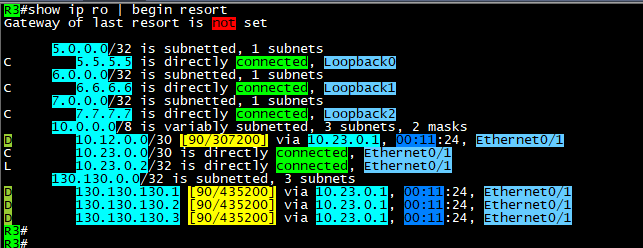
After configuring EIGRP between the three sites, we can see the routing tables with prefixes for the advertised networks

on both sides.


 As you can see above, the host that we will filter is 130.130.130.3/32, we will configure any time that we like the policy 

to start working in it, then we will monitor our logs.


remember it is better to enable logs with the Access list that we will configure in order to see the hits on the policy for the matching

packets.


 Note: the Time based ACL will only be in extended Access Control lists and not in standard.


Now, it is time to define the time range that will be used in access list.


 Commands are:


time-range AFTER-WORK
 absolute start 08:25 26 June 2021

 absolute end 08:43 26 june 2021


the Access list configured as below:

 #ip access-list extended TIME
 #deny   ip host 130.130.130.3 any time-range AFTER-WORK log
 #permit ip any any time-range TIME log


apply it inboung on E0/1 or Router3 and check if its active:


here you go, we have hits on both lines, where we generated some ICMP packets sourced from 130.130.130.3/32

and the permitted log matches the other traffic which include EIGRP packets as well.


As you can see, the packets not reaching the 5.5.5.5/32 SVR when the source of the ICMP is 130.130.130.3/32


 Here above you can see the logs generated by the hit on R3 for both the denied logs and permitted EIGRP packets.

Note: before the time range is activated, it should be seen as inactive as below:


Ok, please note that you must put end option to the time-range settings:


 #time-range AFTER-WORK
 #absolute end 08:42 26 June 2021


 which will put the ACL back to inactive state.


Ok, what about making this task automated? the answer is also by using time-range but with another option which is:


That was it, I hope you enjoyed this post!


Samer Rafid Saleem


Thursday, June 10, 2021

Allowing BGP MD5 authentication through Cisco ASA


Author: Samer R Saleem

We have the following scenario where BGP traffic between routers going through an ASA firewall will face a problem if you have an ASA in the middle of two BGP routers trying to peer and they both are using MD5 authentication.

We will create a lab and solve the issue on the firewall by allowing BGP to authenticate and form peering session between the routers, I will be posting in my labbing results and findings during this and the small topology I used EVE-NG community to simulate this case.

The diagram below is self-explanatory, two routers on the sides and an ASA in between, ip addresses are 192.168.1.0/24 on the left and 12.0.0.0/24 on the right side.

AS111 on R1 and AS222 on R2


you will need to configure the ASA interfaces as below:

G0/0 (ip address and nameif) which is as in the diagram above

G0/1 (ip address and nameif)which is as in the diagram above

Then configure both routers interfaces and ping to make sure ASA is reachable.

To provide reachability I will be using  EIGRP and once completed its adjacency process you will see R2 and R1 networks but they will not have reachability between them, so you will need to add ICMP into ASA firewall inspection:

#class inspection_default

#inspect icmp 

After this, you will have reachability between R1 loopback0 to R2 loopback0, here we start configuring eBGP:

R2:

router bgp 222

bgp log-neighbor-changes

network 200.200.200.200 mask 255.255.255.255

neighbor 1.1.1.1 remote-as 111

neighbor 1.1.1.1 password 12345

neighbor 1.1.1.1 disable-connected-check

neighbor 1.1.1.1 update-source Loopback0

R1:

router bgp 111

bgp log-neighbor-changes

network 100.100.100.100 mask 255.255.255.255

neighbor 2.2.2.2 remote-as 222

neighbor 2.2.2.2 password 12345

neighbor 2.2.2.2 disable-connected-check

neighbor 2.2.2.2 update-source Loopback0

Note: I have created two more loopbacks 100 and 200 in both R1 and R2 and advertised over BGP only, and disabled directly connected check on BGP.

You will see the session comes UP and prefixes appear in both BGP RIB tables.

However, once you add password authentication under BGP, you will start seeing the below logs:

R2(config-router)#

*Sep 11 08:54:44.093: %TCP-6-BADAUTH: No MD5 digest from 1.1.1.1(36963) to 2.2.2.2(179) tableid - 0

R2(config-router)#

*Sep 11 08:54:46.098: %TCP-6-BADAUTH: No MD5 digest from 1.1.1.1(36963) to 2.2.2.2(179) tableid - 0

R2(config-router)#

*Sep 11 08:54:50.106: %TCP-6-BADAUTH: No MD5 digest from 1.1.1.1(36963) to 2.2.2.2(179) tableid - 0

And now the BGP session is lost.

Diagnoses and Solution:

the reason for this is that, BGP is uses TCP 179 protocol, which is fine, but once authentication is used with MD5, ASA will strip the authentication which is TCP option 19


And the routers will not see the MD5 coming with connection attempt because it's being filtered by the firewall, so you will need to add the following part on the Cisco ASA:

1.first you need to create an extended ACL to match the traffic between the BGP routers

access-list bgp extended permit tcp host 1.1.1.1 host 2.2.2.2 eq bgp 

access-list bgp extended permit tcp host 2.2.2.2 host 1.1.1.1 eq bgp 

2.create TCP map to allow option 19

tcp-map allow-tcp-19

tcp-options range 19 19 allow

3.use the global policy map to match the class map BGP that we created to match traffic and apply our settings:

policy-map global_policy

class-map BGP 

match access-list bgp

class BGP

set connection random-sequence-number disable

set connection advanced-options allow-tcp-19

After this is done, you will see the bgp session UP again!

Check the logs again:

R2#

*Sep 11 09:14:59.477: %BGP-5-NBR_RESET: Neighbor 1.1.1.1 active reset (BGP Notification sent)

*Sep 11 09:14:59.477: %BGP-5-ADJCHANGE: neighbor 1.1.1.1 Up 

R2#

RFC about Protection of BGP Sessions via the TCP MD5 Signature Option

https://www.ietf.org/rfc/rfc2385.txt

To download the lab go to my post on Cisco learning Network you will find as a zip attached:

EVE-FILE


I hope this was useful!

Samer R. Saleem


Automating Network Configurations with Jinja2 and Python: A Step-by-Step Guide

 In this post, I worked on collecting a code that works with Jinja template. the nice thing in working with Jinja is that you can have basel...